
.png)
Description
Download AI Hairstyle Changer – Free AI‑Powered Hair Styling Tool for Windows, Mac, Android & iOS
Overview
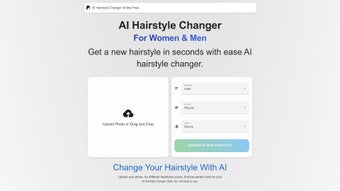
AI Hairstyle Changer is a cutting‑edge, web‑based application that lets anyone experiment with countless hair looks in just a few seconds. By simply uploading a portrait, the platform’s deep‑learning engine analyses facial features, hairline, and texture, then renders realistic previews of new lengths, colors, curls, braids, and trendy cuts. The result is a secure, private, and instantly shareable visual of how you could look before you pick up scissors or book a salon appointment. Whether you’re a fashion enthusiast, a professional stylist, or just curious about a bold new hue, AI Hairstyle Changer provides a risk‑free sandbox where creativity meets technology. The tool is completely free, runs directly in modern browsers, and does not require any installation, making it an ideal companion for both desktop and mobile environments. Its responsive design automatically adapts to the screen size of Windows PCs, macOS laptops, Android tablets, and iOS phones, delivering a consistent experience across all devices. Security is a core focus: all uploaded photos are encrypted in transit, processed on isolated servers, and automatically deleted after the session ends, ensuring users’ personal data remains protected. Beyond casual fun, the application offers practical value for professionals. Hair stylists can use it as a visual aid during client consultations, allowing clients to see a realistic preview of a proposed cut before committing. Salons can integrate the tool into their booking workflow, reducing the number of unwanted re‑appointments caused by mismatched expectations. In addition, the platform receives regular updates that add new style packs, improve AI accuracy, and enhance performance, all without any extra cost to the user. This blend of accessibility, privacy, and professional utility makes AI Hairstyle Changer a standout solution in the growing beauty‑tech market.
Key Features & Benefits
- AI‑Driven Hair Simulation: Uses a proprietary deep‑learning model trained on millions of hairstyles to generate photorealistic results.
- Extensive Style Library: Offers over 500 pre‑loaded hairstyles ranging from classic bob cuts to avant‑garde colors and textured waves.
- Real‑Time Preview: Changes appear instantly, allowing you to toggle between styles without re‑uploading the image.
- Color Customizer: Adjust hue, saturation, and highlights with a simple slider to see how bold reds, pastel blues, or natural shades would look.
- Texture & Volume Controls: Simulate straight, wavy, curly, or kinky hair, and fine‑tune volume to match your desired look.
- Save & Share Options: Export high‑resolution images in JPEG or PNG format, and share directly to Instagram, Facebook, or messaging apps.
- Cross‑Platform Compatibility: Fully responsive design works on Windows, macOS, Android, and iOS devices without extra plugins.
- Privacy‑First Architecture: All image processing occurs on encrypted servers; files are automatically purged after 24 hours.
- Free Updates & New Styles: Regularly receives fresh hairstyle packs and performance upgrades at no extra cost.
- Progressive Web App (PWA) Support: Turn the web app into a native‑like shortcut on any device for quick access.
The combination of these features makes AI Hairstyle Changer more than a novelty app—it’s a practical planning tool for anyone considering a change. Stylists can use it to showcase potential outcomes to clients, while everyday users gain confidence by visualizing a look before committing to a salon appointment. The real‑time feedback loop also encourages experimentation, helping users discover styles they might never have considered. Because the service runs in the browser, there’s no need for bulky software downloads, keeping system resources free and ensuring the app stays lightweight and fast on both older and newer hardware.
Moreover, the platform’s AI engine continuously learns from user interactions, refining its ability to match hair texture, lighting conditions, and face shape. This adaptive learning ensures that each subsequent session becomes more accurate, providing increasingly lifelike renderings. For professionals, the ability to generate a portfolio of client‑specific mock‑ups in minutes can streamline the consultation process, reduce miscommunication, and ultimately increase client satisfaction. The free, regularly updated nature of the tool also means that users are never locked into a stale set of styles; new trends such as pastel balayage, shaved undercuts, or intricate fishtail braids are added as soon as they emerge in the fashion world.
Installation, Usage & Compatibility
How to Get Started (No Download Required)
Although the headline encourages you to “download,” AI Hairstyle Changer is a web‑based app, meaning you simply visit the official website and start instantly. For users who prefer a dedicated shortcut, you can create a Progressive Web App (PWA) on Windows, macOS, Android, or iOS, which places an icon on your desktop or home screen and launches the tool in a standalone window, mimicking a native app experience.
Step‑by‑Step Guide
- Open the website: Use any modern browser (Chrome, Edge, Firefox, Safari) and navigate to the AI Hairstyle Changer homepage.
- Upload your photo: Click “Upload Image,” select a clear, front‑facing portrait with visible hair, and confirm. The AI will scan the image for facial landmarks and hair boundaries.
- Select a style: Browse the style library or use the search bar to find specific cuts (e.g., “pixie,” “balayage”). Click a thumbnail to apply it instantly.
- Fine‑tune details: Adjust sliders for length, color intensity, and volume. You can also toggle “Natural Light” to see how the style looks in different lighting conditions.
- Save or share: Once satisfied, click “Download” to save the image locally, or use the “Share” button to post directly to social media platforms.
- Secure logout: The app automatically deletes your image from the server after the session ends, but you can also manually clear your data from the “Privacy” menu.
Operating System Compatibility
The AI Hairstyle Changer works seamlessly across all major operating systems, including Windows 10/11, macOS 10.15+ (Catalina and later), Android 8.0+ (via Chrome or the PWA), and iOS 13+ (Safari or the PWA). Because it is a browser‑based service, there is no need to install separate binaries, ensuring the tool remains lightweight and secure on both desktops and mobile devices.
Performance is optimized for devices with at least 4 GB RAM and a modern GPU, but even lower‑spec smartphones can run the app thanks to server‑side AI processing. Regular updates are pushed automatically, guaranteeing you always have the latest hairstyle packs and security patches without manual intervention. In addition, the PWA mode stores essential UI assets locally, allowing the interface to load instantly even on slower connections, while all heavy image‑rendering work continues to be performed in the cloud.
Pros, Cons & Frequently Asked Questions
Pros
- Completely free and no hidden fees.
- Instant, realistic previews with AI‑driven accuracy.
- Extensive library of styles, colors, and textures.
- Cross‑platform – works on Windows, Mac, Android, and iOS.
- Secure handling of personal photos; automatic deletion after 24 hours.
- Easy sharing to social media and high‑resolution export.
- Regular free updates add new trends and improve performance.
- PWA option provides a native‑like experience without installation.
- Cloud‑based processing keeps local device resource usage minimal.
Cons
- Requires an internet connection; offline mode is limited to the PWA cache.
- Complex hairstyles (e.g., intricate braids) may need manual tweaking for perfect realism.
- Image quality depends on the original photo – low‑resolution uploads produce less accurate results.
- Advanced color grading tools are basic compared to professional editing software.
- Occasional rendering lag on extremely slow networks.
FAQ – Your Questions Answered
Is AI Hairstyle Changer really free?
Yes, the core features—including the full style library, real‑time preview, and export options—are completely free. Optional premium packs may be introduced in the future, but the basic app remains free for all users.
How does the app protect my privacy?
All uploaded images are encrypted during transmission and processed on secure servers. The platform automatically deletes your photo after 24 hours, and you can manually purge data at any time from the privacy settings.
Can I use AI Hairstyle Changer on an iPhone?
Absolutely. The web app runs smoothly in Safari on iOS 13+ and can be added to your home screen as a Progressive Web App, giving you an app‑like experience without any App Store download.
What image formats are supported for upload?
JPEG, PNG, and WebP are supported. For best results, upload a clear portrait with good lighting and a resolution of at least 800 × 800 pixels.
Do I need a powerful computer to run the AI?
No. The heavy AI computation happens on the cloud, so even modest laptops or smartphones can generate high‑quality previews. A stable internet connection is the main requirement.
How often are new hairstyles added?
The development team releases fresh style packs roughly every month, aligning with seasonal trends and emerging fashion runway looks. Users receive these updates automatically, without needing to refresh or reinstall anything.
Conclusion & Call to Action
AI Hairstyle Changer merges the excitement of digital experimentation with the practicality of professional styling tools. By offering a free, secure, and instantly accessible platform, it empowers anyone—whether a casual user or a seasoned stylist—to visualize hair transformations before making a commitment. The seamless cross‑platform experience, extensive style catalog, and privacy‑first design make it a standout choice among beauty‑tech apps. Ready to see yourself in a fresh new look? Visit the official site, upload your favorite portrait, and start playing with colors, lengths, and textures today. Share your favorite results with friends, get feedback, and walk into your next salon appointment with confidence. Download AI Hairstyle Changer now and discover the hairstyle you’ve always wanted—without the scissors.
Overall Rating: 4.6/5
Pros: Free, realistic AI results, massive style library, privacy‑focused, works on all major OS.
Cons: Requires internet, occasional minor rendering glitches with very complex braids.
Guides & Tutorials for AI Hairstyle Changer
How to install AI Hairstyle Changer
- Click the Preview / Download button above.
- Once redirected, accept the terms and click Install.
- Wait for the AI Hairstyle Changer download to finish on your device.
How to use AI Hairstyle Changer
This software is primarily used for its core features described above. Open the app after installation to explore its capabilities.
User Reviews for AI Hairstyle Changer 0
No reviews found




